Information sheet · For players

Your game, in numbers.

Everything a golfer needs to know about Player Performance Tracking on one page: what you record, what you get back, and who can see it.

Download PDFPDF A4 · 1 page · 115 KB

PPT in one minute

Three things to know.

  1. What you record

    After each round, log your score and a few key stats in a couple of minutes on your phone or computer.

    • Score for every hole
    • Fairways hit, and which way you missed
    • Greens in regulation
    • Putts, up and downs and sand saves
    • Practice sessions and notes, if you like
  2. What you get back

    PPT turns those numbers into a clear picture of your game that builds round after round.

    • Progress charts for scoring and each area
    • Strengths and weak spots, worked out for you
    • Targets you set, and the trend towards them
    • PDF reports to keep or share with your coach
  3. Who can see it

    Your rounds, stats and notes are yours. Access is always deliberate.

    • You see everything you record
    • Coaches only once an admin has approved them
    • Nobody else: your data is never sold or used for adverts

How it fits into your golf

Your first round with PPT.

  1. Print a tracker

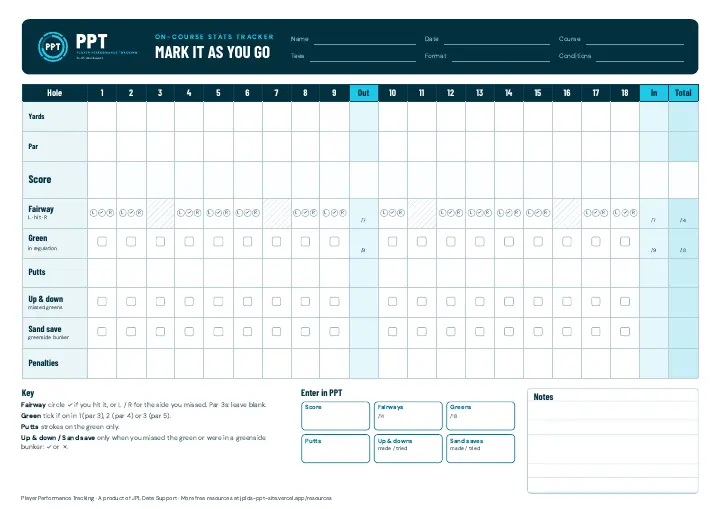
    Take our on-course stats tracker, or just use the back of your scorecard.

  2. Mark each hole

    A tick for the fairway, a tick for the green, and the number of putts. It takes seconds.

  3. Log it in PPT

    Enter your round in about two minutes, while it is fresh. Add a note if something stood out.

  4. Watch it build

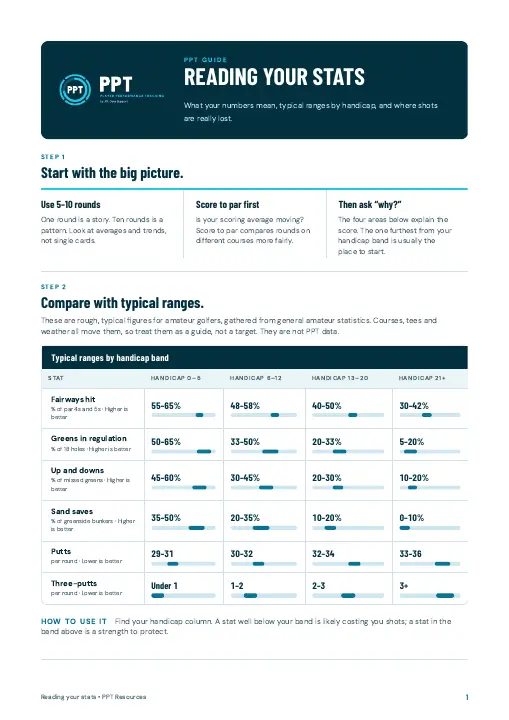
    After five to ten rounds, your charts start to show where shots are really won and lost.

What you will learn

Four questions PPT answers.

Most golfers guess where their shots go. PPT replaces the guess with your own numbers, area by area.

Read the guide to your stats →
  • Driving

    Do my tee shots keep me in play?

    Fairways hit and your miss pattern, left or right.

  • Approach

    How often do I give myself a chance?

    Greens in regulation, round by round.

  • Short game

    Do I save shots when I miss a green?

    Up and downs, scrambling and sand saves.

  • Putting

    Am I losing shots on the greens?

    Putts per round and three-putts.

Good to know

Quick answers.

Do I need any special kit?
No. PPT works on any phone, tablet or computer. A pencil and the tracker sheet are all you need on the course.
How long does it take?
About two minutes after each round. Logging a practice session is quicker still.
What if I forget a stat?
Log what you have. Your score still counts, and a few gaps will not spoil your trends.
Can my coach see my rounds?
Only if they have asked for access and an admin has approved it. They can then add lesson notes to your profile.
What do the stats actually mean?
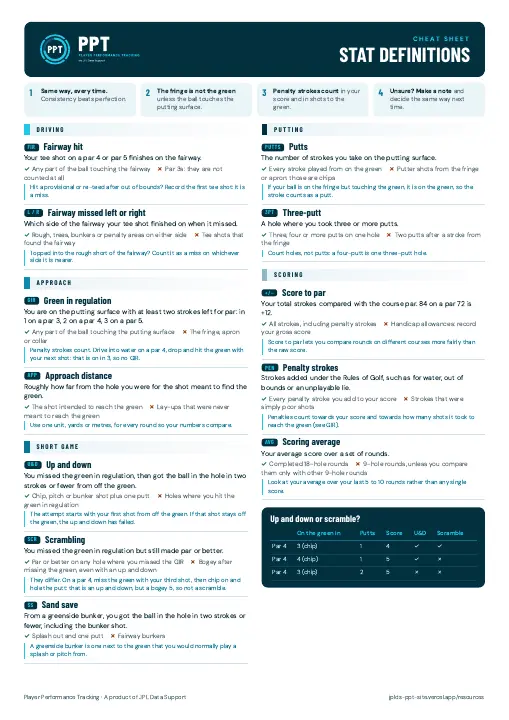
Our stat definitions cheat sheet explains exactly what counts as a fairway, a green, an up and down and more.
Is it only for low handicappers?
Not at all. PPT is just as useful for a junior starting out or a 28-handicapper as it is for a scratch golfer.

Player information sheet

Your game.
Your data.
Your progress.

What is PPT?

Player Performance Tracking helps you see where shots are won and lost. Log a few key stats after each round and PPT turns them into charts, strengths, weak spots and targets, so you can practise with purpose and track your improvement over a season.

1What you record

  • Your score for every hole
  • Fairways hit, and which way you missed
  • Greens in regulation
  • Putts, up and downs and sand saves
  • Practice sessions and notes

2What you get back

  • Progress charts for scoring and each area
  • Your strengths and weak spots
  • Targets and the trend towards them
  • PDF reports for you and your coach

A round with PPT

  1. BeforePrint a tracker or use your scorecard
  2. DuringTick fairways and greens, count putts
  3. AfterLog the round in about two minutes
  4. Over timeYour charts show where to improve

Four questions PPT answers

DrivingDo my tee shots keep me in play?
ApproachHow often do I give myself a chance?
Short gameDo I save shots when I miss a green?
PuttingAm I losing shots on the greens?

Useful next steps

  • On-course stats trackerA printable card for marking each hole
  • Stat definitionsExactly what counts as a fairway, green and more
  • Reading your statsWhat your numbers are telling you
A product of JPL Data SupportMore free resources: jplds-ppt-site.vercel.app/resources

Keep going

Related resources

All resources →

A new version of this site is available.Refresh to see the latest updates.